Most Businesses Already Have AI-Ready Data Sitting in Reviews
How customer review sentiment analysis works with a free, open-source local Python classifier. A walkthrough of the code and a demo you can run locally.
Most businesses already have AI-ready data sitting in reviews.
App store comments. Post-delivery survey responses. Booking site ratings with a written explanation. Support ticket follow-ups. Teams collect all of it, read a sample, maybe tag a few themes in a spreadsheet, and move on. What remains is unstructured, unsearchable, and full of signal.
Customer review sentiment analysis closes that gap — not as a magic dashboard, but as a first filter. It labels text positive, negative, or neutral, with a confidence score teams can actually use.
Why customer reviews are the easiest place to start
Three things make review text ideal for a first NLP pass:
- It already exists. You don’t need new customer surveys.
- It’s short. A sentence or two is enough for a classifier.
- It maps to decisions. Labels can drive escalation, marketing follow-up, or a human review queue.
You don’t need a data lake or a fine-tuned LLM to get value. A lightweight local sentiment analysis model running on-premises can label thousands of entries overnight — and keep the text inside your network.
A small project that does exactly this
Feedback Intelligence is a minimal Flask app built for this workflow. Paste feedback into a form and get a label back — or import the analyzer in Python and run it over a CSV export from your CRM.
It’s free and open source. Download the Hugging Face model once (~250 MB), and it runs offline from there.
The web handler: form in, label out
Submit text, run the analyzer, render the result on the same page. Plain server-rendered HTML — no JavaScript needed.
@app.post("/")
def analyze():
    """Run sentiment analysis on submitted feedback."""
    text = request.form.get("textToAnalyze", "").strip()
    if not text:
        return render_template(
            "index.html",
            error="Please enter some text to analyze.",
        )

    response = sentiment_analyzer(text)
    return render_template(
        "index.html",
        text=text,
        result={
            "sentiment": _format_label(response["label"]),
            "confidence": round(response["score"] * 100),
        },
)For a support team, that’s the integration in practice: text arrives, a function returns { label, score }, and routing logic decides what happens next.
The model: local, cached, reusable
The analyzer loads Cardiff NLP’s Twitter RoBERTa sentiment model through Hugging Face’s pipeline. It initializes once and stays in memory — useful when you’re scoring a backlog, not just one sentence at a time.
MARGIN_THRESHOLD = 0.35
MODEL_ID = "cardiffnlp/twitter-roberta-base-sentiment-latest"


@functools.lru_cache(maxsize=1)
def _get_classifier():
    """Load the sentiment pipeline once and reuse it."""
    return pipeline(
        "sentiment-analysis",
        model=MODEL_ID,
        top_k=None,
)One public function handles everything — easy to call from a script, a cron job, or a REST endpoint inside a business application:
def sentiment_analyzer(text_to_analyse):
    """
    Run sentiment analysis on the given text.

    Returns a dict with ``label`` and ``score``.
    """
    scores = _get_classifier()(text_to_analyse)[0]
return _map_label(_scores_by_label(scores))In Python, usage looks like:
from sentiment_analysis import sentiment_analyzer

result = sentiment_analyzer("I love this new technology.")
# {"label": "positive", "score": 0.98}That’s the integration surface for batch jobs: read a row, call sentiment_analyzer, write the label to a new column.
Business rules on top of the model
Raw model output isn’t always what a product manager should see. When positive and negative scores are nearly tied, calling the result strongly positive or strongly negative is misleading. Real feedback like “It works, but shipping was slow” often lands in that grey zone.
The project uses a margin threshold. If the gap between positive and negative scores falls below 0.35, the result is treated as neutral:
def _map_label(by_label):
    """Map model probabilities to the app's three-label format."""
    positive_score = by_label.get("positive", 0.0)
    negative_score = by_label.get("negative", 0.0)
    neutral_score = by_label.get("neutral", 0.0)

    if neutral_score > 0:
        scores = {
            "neutral": neutral_score,
            "positive": positive_score,
            "negative": negative_score,
        }

        best_label = max(scores, key=scores.get)
        return {"label": best_label, "score": scores[best_label]}

    margin = abs(positive_score - negative_score)
    if margin < MARGIN_THRESHOLD:
        return {
            "label": "neutral",
            "score": max(positive_score, negative_score),
        }
    if positive_score > negative_score:
        return {"label": "positive", "score": positive_score}
return {"label": "negative", "score": negative_score}This is where AI-ready data becomes business-ready data. The model returns probabilities; application rules decide how cautious to be before routing a ticket or flagging a review.
What the demo looks like
The web UI is a manual probe: paste text, read the label and confidence score. Handy for checking edge cases before wiring the analyzer into a pipeline.
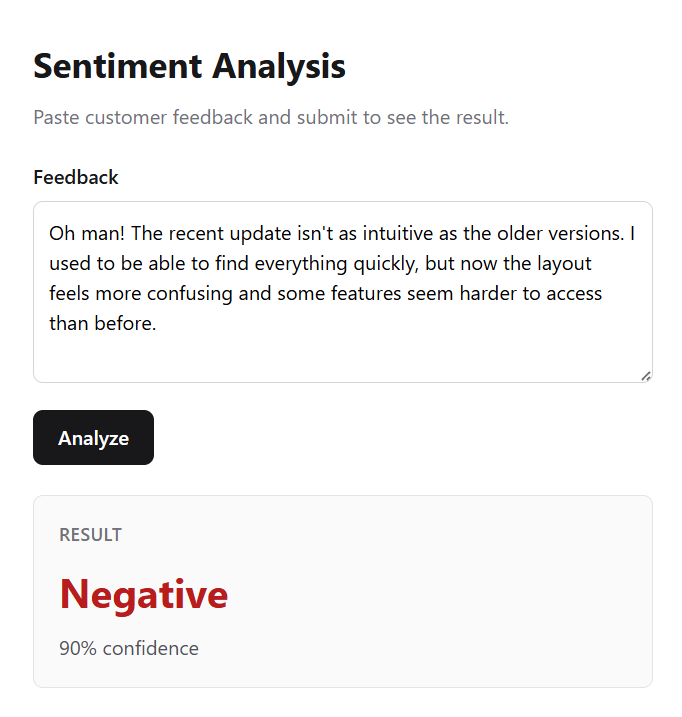
In the screenshot, a multi-sentence app update review lands Negative at 90% confidence. The complaint isn’t a single obvious keyword — the model weighs phrasing across the whole passage. That kind of output is worth sanity-checking before you trust a batch run.
The copy-paste step is a starting point, not the destination. The sentiment_analyzer function plugs into batch pipelines (nightly CSV jobs, ETL workflows, queue workers) or sits behind an endpoint in a CRM or business application. Salesforce custom fields, HubSpot ticket routing, an internal support portal — wherever text arrives, it can be classified before a human opens the record.
Run it locally with python server.py and open localhost:5000. Try a few real reviews and watch where the margin rule kicks in.
A practical starting point
You don’t need to boil the ocean. Export a month of survey responses, run them through a local classifier, sort by negative score, and review the top entries by hand.
That focused pass often surfaces recurring themes you’d miss when feedback trickles in one response at a time across different tools.
Where to take it next
This project draws on the IBM Applied AI Professional Certificate on Coursera.
It covers one slice of the pipeline. IBM Watson Libraries offer embeddable building blocks for extending it — speech-to-text, for example, so audio can be transcribed and run through the same sentiment pass.
The full project lives on GitHub: asaleh-lab/feedback-intelligence-api. Clone it, run it against a review export, and see what signal is already in your data.